





How to Create Website Mockups People Actually Love
Learn how to create website mockups that bridge the gap between idea and reality. Our guide covers tools, principles, and developer handoff.
EXAMPLES
Build beautiful websites like these in minutes
Use Alpha to create, publish, and manage a fully functional website with ease.
Not too long ago, building a business website meant hiring expensive developers or getting tangled up in complex code. Thankfully, modern AI tools have changed the game, letting you get a professional-looking site up and running in just a few hours.
But before you jump into the fun stuff, we need to lay the groundwork. The most crucial first step is figuring out your website's primary purpose and who you're building it for. Nail this, and you're setting yourself up for a site that actually grows your business from the moment it goes live.
Defining Your Website’s Purpose and Audience
Before you even think about a color scheme or write a single word of copy, you have to answer one simple question: What is this website's main job? Without a crystal-clear answer, you risk creating a site that’s all style and no substance—a pretty digital brochure that doesn't actually do anything for your bottom line.
Think of your website's purpose as its North Star. It guides every single decision you make, from the layout and navigation to the content you create. For instance, if you want potential clients to book a consultation, your design needs big, obvious "Schedule Now" buttons and a dead-simple contact form. If you're running an e-commerce store, your focus is entirely on a smooth shopping experience and a frictionless checkout process.
Clarifying Your Primary Goal
Imagine your website is your best employee, working tirelessly for you 24/7. What’s the single most important task you'd give it?
Most business websites fall into one of these buckets:
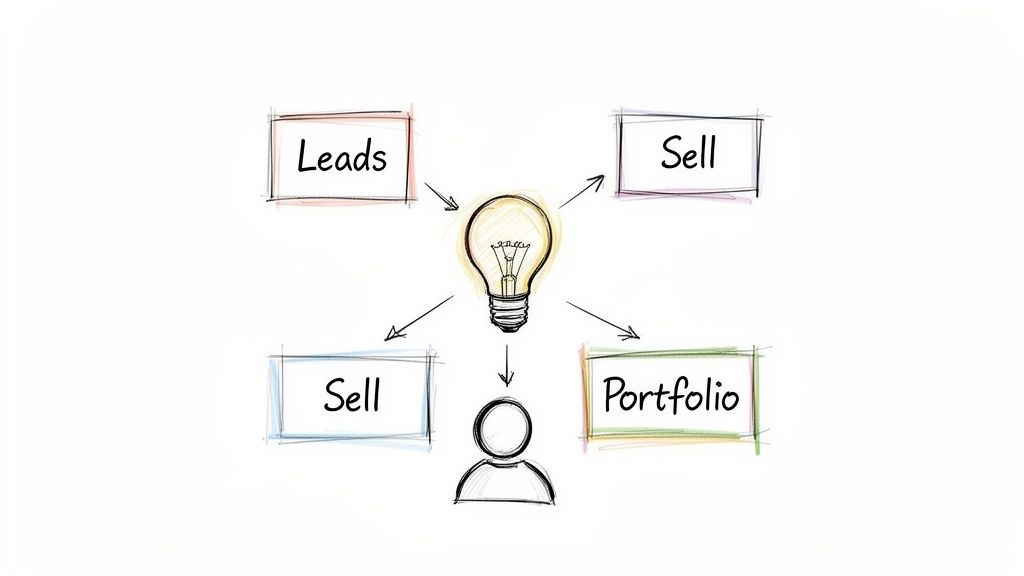
Lead Generation: This is the go-to for service businesses—think consultants, marketing agencies, or local contractors. The entire site is engineered to capture visitor information through things like contact forms, free quote requests, or click-to-call buttons.
Direct Sales (E-commerce): If you sell products, whether they're physical goods or digital downloads, your website is your storefront. The primary mission here is to move products, plain and simple.
Showcasing Work (Portfolio): Perfect for creatives like photographers, designers, or architects. The website acts as a virtual gallery, where the main goal is to display your best work in a compelling way to land new clients.
Providing Information: Some businesses just need a solid online presence. A local restaurant, for example, primarily uses its site to share essentials: hours, menu, location, and phone number.
A website without a clear purpose is like a ship without a rudder. It might look impressive, but it won't get you anywhere. Defining your primary objective ensures every element on your site serves a strategic business goal.
Identifying Your Ideal Customer
Okay, so you know what your site needs to do. Now, who is it for? I've seen it a thousand times: business owners try to appeal to everyone, and in the end, they connect with no one. You have to get specific. A deep understanding of your target customer lets you write copy that speaks directly to their pain points and position your business as the perfect solution.
This user-first thinking is critical. To dig deeper into this concept, check out this excellent guide on Building a User-Centric Website: What Every Business Owner Should Know. It’s all about creating a site that not only looks good but actually works for the people using it.
This process is a core part of developing your brand identity. For more on that, you can explore our guide on small business branding tips. When you combine a clear purpose with a sharp audience focus, you’ve got the foundation for a website that truly performs.
Structuring Your Website For Maximum Impact
Before you even think about colors, fonts, or flashy animations, we need to talk about the blueprint. A great website is built on a smart plan, and this strategic groundwork is what turns casual visitors into paying customers. It’s the difference between an online brochure and a well-oiled machine built to grow your business.
So, let's roll up our sleeves and lay the foundation. This starts with getting crystal clear on what you want your website to actually do.
Set Specific and Measurable Goals
It’s easy to say you want a website to "get more business," but that’s too vague. What does success actually look like? A specific, measurable goal gives you a benchmark to aim for and keeps your design and content focused.
Think in real-world terms:
A local bakery might aim to increase online cake orders by 30% in the next six months.
A marketing consultant could set a goal to generate 15 qualified leads per month through their contact form.
An artist might want to grow their email newsletter list by 500 subscribers to announce new work.
See the difference? These goals are tangible and time-bound, making it easy to know if your website is really pulling its weight.
A website's structure should be a direct reflection of its primary business goal. If you want visitors to book a demo, the path to the booking page should be effortless and obvious from the moment they land on your homepage.
Create Your Website Sitemap
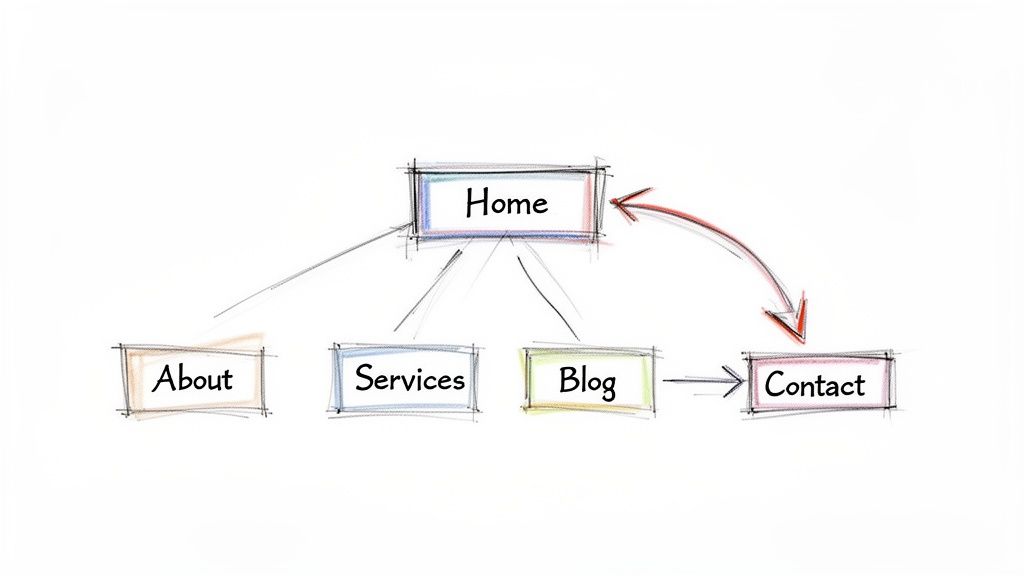
Once you know your goal, it's time to sketch out your sitemap. Think of it as the floor plan for your digital storefront. It outlines all the essential pages and shows how they connect, ensuring a logical flow for both users and search engines.
For most small businesses, a simple, effective sitemap is all you need to get started. You can always expand it later. For a deeper dive, check out our guide on how to plan your website structure.
Here’s a quick look at the core pages almost every business website needs.
Essential Pages for Your Business Website Sitemap
This table breaks down the non-negotiable pages for your business website. Use it as a checklist to ensure you've covered all the essential bases in your sitemap.
Page | Primary Purpose | Key Elements to Include |
|---|---|---|
Homepage | Make a strong first impression and direct visitors to key areas of your site. | A compelling headline, a clear call-to-action (CTA), and brief summaries of your services. |
About Us | Build trust and connect with your audience on a personal level. | Your business story, mission, and photos of you or your team. |
Services/Products | Clearly explain what you offer and highlight the benefits for the customer. | Detailed descriptions, pricing information (if applicable), and high-quality images or videos. |
Contact | Make it incredibly easy for potential customers to get in touch. | A simple contact form, phone number, email address, and physical location with a map. |
Having this clear navigation prevents visitors from getting frustrated and helps them find what they're looking for fast. And in today's market, a professional online presence isn't optional. The website builder industry was valued at USD 2.1 billion and is projected to nearly double as small and medium-sized enterprises—which make up over 60% of the market—rush to get online. You can find more insights on the growth of small business websites on Wix.com.
Analyze Your Competition
Here’s one of the smartest (and most overlooked) steps you can take: do a little recon. Pick three to five websites in your industry—both direct competitors and brands you admire—and see what they’re doing well.
Don't just glance at their design. Really dig in:
How do they organize their services?
What kind of language do they use to talk to customers?
What calls-to-action are most prominent on their homepage?
This isn't about copying anyone. It's about learning what's already working in your market and spotting opportunities to do things even better. This quick analysis can spark powerful ideas for making your own site stand out.
Choosing the Right Tools for the Job
Let's be honest, the days of needing to hire a web developer just to get your business online are long gone. The big decision you face now isn't who will build your site, but what you'll use to build it yourself. This really comes down to two main paths: the old-school, traditional website builders versus the new wave of AI-powered platforms.
For a long time, platforms like WordPress were the only game in town for serious businesses. They’re incredibly powerful, with a universe of themes and plugins to do just about anything. But that power comes with a price—a notoriously steep learning curve. Before you know it, you’re wrestling with hosting issues, plugin conflicts, and theme customizations. For a busy entrepreneur, that can feel like a second full-time job.
The Rise of AI Website Builders
This is exactly why AI website builders have been turning heads. They’re built specifically for business owners who need to move fast and can't afford to get bogged down in technical details. Instead of spending weeks learning a new system, you can have a professional-looking, fully functional website up and running in a few hours. Sometimes even minutes.
What’s the big deal? It comes down to a few huge advantages:
Unbelievable Speed: AI automates the grunt work. You give it some basic info about your business, and it handles the initial design, structure, and even a first draft of your content.
Ridiculously Easy to Use: Forget clunky drag-and-drop editors. Many modern AI tools let you make changes with simple text commands. Picture this: you type, “Add a testimonial section with three client photos,” and boom—it appears.
Optimized Out of the Box: These platforms usually have all the important stuff baked right in—SEO tools, mobile-ready design, and security. That means fewer technical headaches for you to worry about down the road.
This isn't just a small trend; it's a massive shift. The global AI website builder market is already worth over USD 1.2 billion and is poised for huge growth. A recent report even found that a stunning 67% of business owners are choosing AI tools specifically for their speed and smart features. You can dive into the full analysis in the AI website builder market report on DataIntelo.com.
A Smarter Way to Approach Design
One of the most powerful features I’ve seen in newer AI builders is the ability to import a design from an existing URL. This is a total game-changer, especially if you get paralyzed by the "blank canvas" problem when starting a new project.
Think about it. Instead of scrolling through endless templates or trying to design something from scratch, you can just find a website you already admire—maybe even a competitor's—and use it as a launchpad. You just feed the URL to the AI, and it analyzes the layout, color palette, and fonts to create a similar, fully-customizable design for you.
This isn’t about plagiarizing someone’s site. It’s about learning from what already works. You’re starting with a proven, user-friendly layout instead of guessing what might be effective.
This feature alone can save you dozens of hours and help you launch with a design that looks polished and professional right from the start. You get the look and feel of a high-end site without the high-end cost or the painful learning curve. If you're weighing your options, our guide on the best website builders for small businesses breaks down the top players in the market.
Ultimately, picking the right tool comes down to what you value most: your time, your budget, and your sanity. For most entrepreneurs focused on growth, an AI platform is the fastest and most efficient way to build a website that not only looks fantastic but actually drives results.
3. Bringing Your Brand to Life with Design and Content
Alright, you’ve picked your platform. Now for the fun part: turning that blank canvas into a true reflection of your business. This is where the magic happens, where you combine smart design with compelling words to build a real connection with your visitors.
Your website’s design is so much more than a pretty background—it's your digital handshake. It’s the first impression that instantly tells people who you are and what you stand for. A clean, professional design builds immediate trust, while a clunky or dated site can make even the most reputable business seem amateur.
Nail Down Your Visual Brand Identity
Before you even think about writing your homepage headline, you need to lock in the core visual elements that will define your online presence. Consistency is everything. It’s what makes your brand stick in people's minds and feel professional across every single page.
Start with these three fundamentals:
Your Color Palette: Don't go crazy here. Pick two or three primary colors that genuinely reflect your brand's personality. A financial consultant might lean on blues and grays to signal trust and stability, whereas a shop selling handmade toys would naturally gravitate toward bright, energetic colors.
Your Typography: You really only need two fonts—one for your headlines and another for your body text. The most important thing is that they are clean, easy to read on any screen, and complement each other. Your font choice is a subtle but powerful cue about your brand’s tone.
Your Logo: This is your signature. Make sure you have a high-quality version and place it where people expect it: right in the top-left corner of your header.
When these elements work together, they create a cohesive visual language. From the second someone lands on your site, they should get a gut feeling for what your business is all about.
This decision tree gives you a simplified way to think about choosing your primary website tool, which has a direct impact on your design options and capabilities.
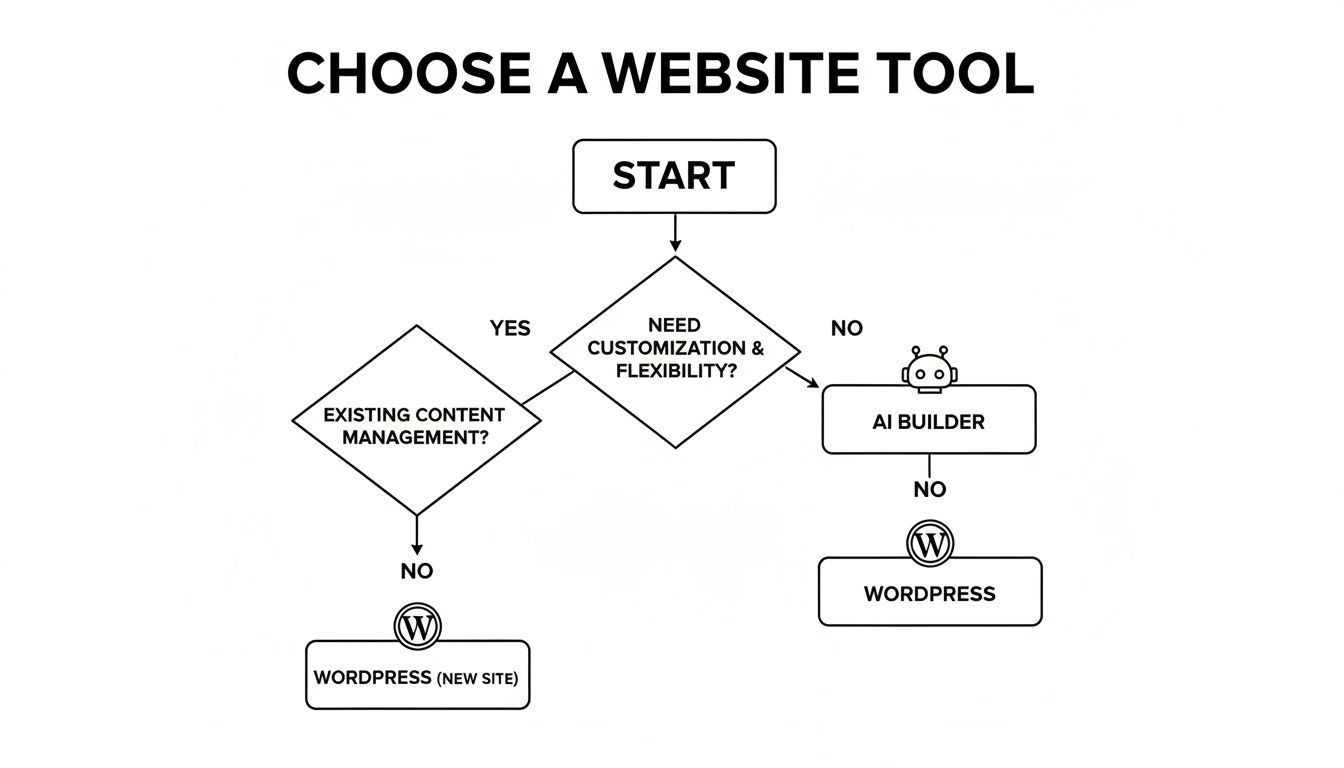
As the flowchart shows, while platforms like WordPress offer deep customization, AI builders are often the straightest path for businesses that need to get a great-looking site up and running quickly.
Writing Content That Actually Connects
With your design foundation set, it’s time to focus on the words and images that will do the real selling. Your content needs to be clear, customer-focused, and persuasive. Here’s a little secret: stop talking about what you do and start focusing on what problems you solve for your customers.
Here's a practical approach for your most important pages:
The Homepage: This is your digital storefront. You need a powerful, punchy headline that immediately answers the question, "What's in it for me?" Use this page to direct people to the most critical parts of your site, like your services or your contact page. No fluff.
The About Page: Please, don't make this a dry history lesson. This is your chance to tell your story and be human. Share your mission, introduce the real people on your team, and let your brand's personality come through.
The Services/Products Page: Resist the urge to just list features. Instead, translate every feature into a tangible customer benefit. Don't just say, "we offer 24/7 support." Say, "you get peace of mind knowing we're always here to help, day or night." See the difference?
The Contact Page: Make it dead simple for people to get in touch. Include a basic contact form, your email, your phone number, and a map if you have a physical location. Get rid of any and all friction that could stop a potential customer from reaching out.
Pro Tip: Your website copy should always speak directly to your ideal customer. Use the words "you" and "your" way more than you use "we" and "our." Frame absolutely everything in the context of their needs, their challenges, and their goals.
Don't forget that high-quality images are just as important as your words. Ditch the generic, cheesy stock photos whenever you can. Instead, invest in professional photos of your actual team, your products in action, or your finished work. Authentic images build trust and make your business feel real.
This is another area where modern AI tools can be a huge help. They can whip up first drafts of copy or suggest different page layouts, giving you a fantastic starting point. From there, you just need to step in and add your unique expertise and voice, polishing the content until it sounds exactly like you.
8. Turning Your Site Into a Customer Magnet
A beautiful website is a great start, but let's be honest, it's not enough. If potential customers can't find you on Google, or if they visit your site and leave without doing anything, you've essentially built a gorgeous billboard in the middle of a desert.
This is where you shift gears from just building a website to making it work for your business. It all boils down to two concepts that are crucial for growth: Search Engine Optimization (SEO) and Conversion Rate Optimization (CRO). Don't let the acronyms scare you; they’re just practical ways to get in front of the right people and turn them into customers.
First, Get Found: The Basics of SEO
SEO is all about helping search engines like Google understand your website so they can show it to people who are actively looking for what you offer. You don’t need to be a technical wizard to get the fundamentals right, especially since modern tools do most of the heavy lifting.
Just focus on a couple of key areas to start:
Keyword Research: This is simply figuring out what words and phrases your ideal customers are typing into Google. Think from their perspective. A local plumber isn't just targeting "plumber." They're targeting "emergency plumbing repair in [City Name]" or "how to unclog a kitchen sink." Get specific.
On-Page SEO: This just means putting those keywords in the right places on your site. The most important spots are your page titles, your main headings (like the ones in this guide), and the meta descriptions—those little blurbs of text you see under a headline in search results.
The best SEO advice I can give is to stop trying to "do SEO" and start creating genuinely helpful content that answers your customers' questions. When you focus on delivering real value, you’ll naturally start doing what search engines want to reward.
This simplified approach is a huge reason why so many entrepreneurs are now building their own sites. The global market for website builders was valued at USD 3.94 billion and is expected to explode to USD 49.12 billion by 2034. Why the massive jump? It's driven by small businesses—who make up over 60% of the user base—realizing they can launch a professional site without the old headaches. You can read more about the explosive growth of website builders on Market.us.
Then, Get Action: Turning Visitors Into Customers
Once SEO starts bringing people to your site, CRO takes over. The entire goal of CRO is to guide visitors toward taking a specific, valuable action. It's about making their next step so obvious and easy that they don’t even have to think about it.
To really get the most out of your website traffic, it’s worth understanding what is conversion rate optimisation and how it plugs the "leaks" that cause potential customers to leave your site.
It really comes down to a few core elements:
Powerful Calls-to-Action (CTAs): These are the buttons and links that tell visitors what to do next. Weak, generic phrases like "Click Here" don't cut it. You need strong, action-oriented language. Think "Get Your Free Quote" or "Download My 10-Point Checklist."
Effortless Forms: If you need people to fill out a contact form, make it dead simple. Ask for only the absolute essentials—name, email, and their message is usually plenty. Every extra field you add is another reason for someone to give up.
Smart Placement: Put your most important CTAs and forms where people can’t miss them. This means right in your homepage header, at the bottom of every blog post, and on all your main service pages.
When you pair SEO and CRO, you create a powerful one-two punch for your business. SEO brings in a steady stream of the right people, and CRO makes sure more of them turn into leads, sales, and subscribers.
9. The Pre-Launch Checklist: Your Final Systems Check
Before you hit that "publish" button and show your new website to the world, it's smart to run through a final checklist. This last pass-through helps you catch any small mistakes or oversights that could hurt the user experience or your initial marketing efforts. Think of it as the final walkthrough before opening the doors to your new digital storefront.
Here is a simple table you can use to make sure all your bases are covered.
Pre-Launch Website Checklist
Checklist Item | Status (Done/Pending) | Notes |
|---|---|---|
Proofread all content | Check for spelling, grammar, and typos. | |
Test all links | Ensure no broken internal or external links. | |
Verify all forms work | Submit a test entry on every form. | |
Check mobile responsiveness | View site on a phone and tablet. | |
Optimize all images | Compress images for fast loading. | |
Set up SEO titles & descriptions | Write unique meta tags for each key page. | |
Confirm analytics are installed | Check that your tracking code is active. | |
Create a 404 error page | A custom "Not Found" page is better than a generic one. | |
Check browser compatibility | View the site in Chrome, Firefox, and Safari. |
Taking just 30 minutes to run through this list can save you from a lot of embarrassing "oops" moments after you've already announced your launch. It ensures that your first visitors have a smooth, professional experience right from day one.
Launching Your Website and Planning What's Next
You’ve built it, you've tweaked it, and now you’re ready to share it with the world. But hitting that 'publish' button isn’t the finish line—it's the starting gun. This is where the real work begins, turning that beautiful website into a genuine growth engine for your business. A smart launch plan is all about starting with momentum, not crickets.
Before flipping the switch, do one last sweep. I mean it—click every link, fill out every form, and test every button. Check it on your phone, your tablet, and your desktop. A single broken link or a form that doesn't submit can easily cost you a customer.
Your Initial Promotion Strategy
Once you're absolutely sure everything is running smoothly, it's time to make some noise. You don't need a massive marketing budget to get the word out. In fact, a few simple, direct actions can create that crucial first wave of traffic.
Think of these as your easy wins:
Social Media Announcement: Post a simple, clear message on all your social channels. Share the link and highlight one thing your followers will find genuinely useful on the new site.
Email Signature Update: This is one of the easiest and most overlooked tactics. Add a link to your new website right in your email signature. Every email you send becomes a mini-advertisement.
A Personal Launch Email: Draft a straightforward email to your existing network—think past clients, colleagues, and professional contacts. Let them know your new digital home is open for business.
These first steps are all about getting immediate, relevant eyeballs on your site from people who already have a reason to care.
Understanding Your Website's Performance
So, your site is live and people are starting to show up. Great! But how do you know if it's actually working? This is where analytics come in, and trust me, you don't need to be a data scientist to get a handle on it.
Understanding basic website analytics is like listening to your customers. The data tells you what they love, what confuses them, and where they want to go next, giving you a clear roadmap for improvement.
Many modern website builders, including Alpha, have simple, built-in analytics that make this incredibly easy. To avoid getting overwhelmed, just focus on two key metrics at the very beginning:
Unique Visitors: This number tells you how many individual people are checking out your site. It’s a great baseline for measuring your reach.
Top Pages: This shows you which pages are getting the most attention. It’s a direct indicator of what content is hitting the mark with your audience.
Watching these two simple numbers is your starting point. This is how you begin to learn, adapt, and make informed decisions over the first 30 days to really start growing your business online.
Got Questions? We've Got Answers
Jumping into website creation for the first time? It's totally normal to have a few questions. Getting these sorted out upfront will help you move forward with a lot more confidence. Let's dig into some of the most common things business owners ask.
What’s the Real Cost to Build a Business Website?
Honestly, the price tag can be all over the map, swinging from a couple of hundred bucks to well over ten thousand.
If you're looking for the most straightforward, budget-friendly option, a DIY AI website builder is your best bet. These usually come with a simple monthly or annual fee that wraps up everything you need—hosting, security, the works. It’s a world away from the cost of hiring a freelancer (which can easily run you $2,000–$10,000+) or a full agency, where projects often kick off at $10,000 and climb from there.
How Much Time Should I Set Aside for This?
In the not-so-distant past, you'd be looking at a 4-6 week timeline with a traditional developer just for a basic site. Thankfully, modern AI platforms have completely changed the game. Now, you can get a polished, professional website up and running in a matter of hours.
The whole process is incredibly direct. You just plug in your business details, pick a style you like, and the AI handles the heavy lifting, creating a full site that’s ready for you to add your final content.
The biggest shift in website creation is speed. What used to take a team of experts weeks to accomplish can now be done by a solo entrepreneur in a single afternoon, freeing up valuable time to focus on the business itself.
Do I Need to Be a Tech Whiz to Build My Own Site?
Absolutely not. While some website-building tools still feel like you need a degree in computer science, today’s AI-powered builders are made for total beginners.
If you can write an email or post on social media, you have all the technical skills you need. You can tweak your design and update text using simple, plain-English commands, all without ever needing to look at a single line of code.
What Are the Absolute Must-Haves for a Business Website?
Every solid business website needs a few core things to work. Right off the bat, you need a super clear description of what you do and who you do it for. And please, make your contact information obvious and easy to find.
Beyond that, make sure your site includes these essentials:
Professional Photos and Videos: Nothing builds credibility faster than high-quality visuals.
Clear Calls-to-Action (CTAs): Don't make visitors guess. Tell them what to do next, whether it’s ‘Contact Us,’ ‘Shop Now,’ or ‘Get a Quote.’
A Flawless Mobile Experience: Your site has to look amazing and function perfectly on a smartphone. No exceptions.
Customer Testimonials: Let your happy customers do the selling for you. Social proof is incredibly powerful for building trust.
Ready to stop planning and start building? With Alpha, you can generate a stunning, conversion-focused website in minutes using AI. Forget the technical headaches and long timelines.
EXAMPLES
Build beautiful websites like these in minutes
Use Alpha to create, publish, and manage a fully functional website with ease.