





How to Create Website Mockups People Actually Love
Learn how to create website mockups that bridge the gap between idea and reality. Our guide covers tools, principles, and developer handoff.

EXAMPLES
Build beautiful websites like these in minutes
Use Alpha to create, publish, and manage a fully functional website with ease.
So, you need to create a sitemap for your website. The easiest route for most people, especially if you're an entrepreneur juggling a million things, is to use a CMS plugin like Yoast SEO for WordPress. It builds and updates your sitemap file automatically, so it's a "set it and forget it" kind of deal. You could also use an online tool like XML-Sitemaps.com or even build one by hand with a simple text editor if you're feeling adventurous.
Once it's ready, you just need to submit the sitemap URL (which usually looks like yourdomain.com/sitemap.xml) to Google Search Console. This simple step helps search engines find and crawl all your pages without breaking a sweat.
Why Your Website Needs a Sitemap

Before we get into the nitty-gritty, let's talk about why a sitemap is so essential. Think of it as a direct line of communication with Google and other search engines. You're essentially handing them a roadmap that spells out exactly what's on your site and which pages you consider most important.
It's not just another technical file to check off a list; it's a fundamental part of a smart SEO strategy.
Speeding Up Discovery and Indexing
If you've just launched a new website, a sitemap is your best friend. It can seriously speed up the indexing process. Instead of just waiting around for Google to stumble upon your pages through links, you're proactively giving it a full directory. This gets your content into the search results much, much faster.
For more established sites, a sitemap ensures that every single important page gets seen. From those deep-level blog posts you wrote years ago to brand-new product pages, it prevents your valuable content from getting lost in the shuffle. This kind of direct guidance is a core principle in any solid overview of what is search engine optimization and how it all fits together.
XML vs HTML Sitemaps
It's really important to know the difference between the two main types of sitemaps because they do completely different jobs.
XML Sitemaps: These are built exclusively for search engines. They're written in XML (Extensible Markup Language) and list your site's URLs along with extra details, like the last time a page was updated. This is the one we're mostly focused on for SEO.
HTML Sitemaps: These are for your human visitors. An HTML sitemap is basically just a page on your site that links out to all the major sections, helping real people find what they're looking for. It's a nice touch for user experience.
A sitemap isn’t just about listing pages; it's about guiding search engines to your most valuable content. It tells them, "Hey, pay attention to these pages first." This simple act helps crawlers use their resources more effectively on your site.
Sitemaps really became a big deal as the internet just exploded with content. To get the full picture, check out this great explanation of what a website sitemap is and why it's a must-know for SEO. Think about it: with 175 new websites created every minute, a well-made sitemap is one of the best ways to cut through the noise and get your pages indexed.
How to Create a Sitemap: Finding the Right Method for You
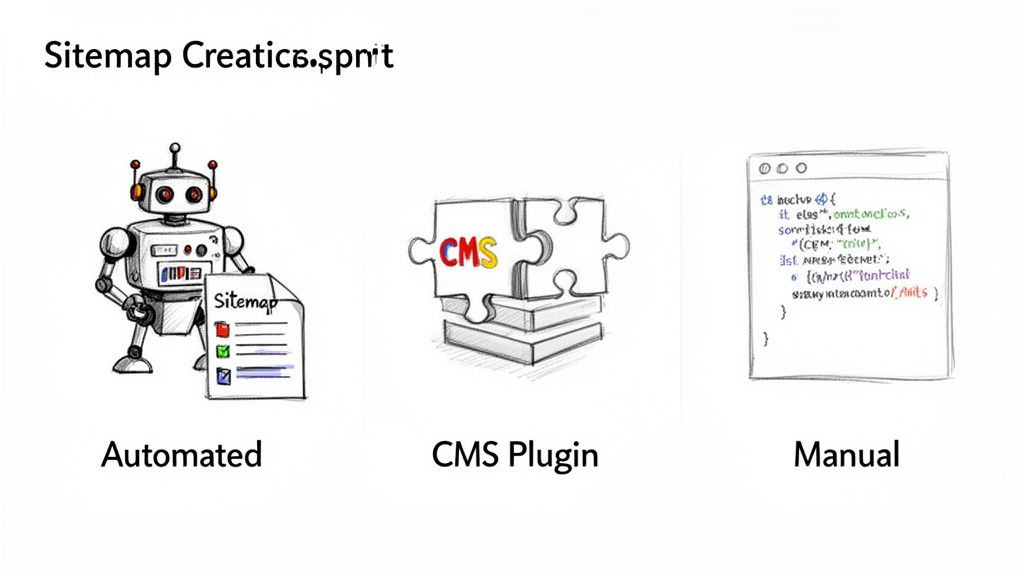
When it comes to creating a sitemap, there's no single "best" way—it all boils down to your website's platform, how comfortable you are with the technical side of things, and honestly, how much time you want to spend maintaining it.
Let's walk through the most common approaches. For most business owners, the goal is to get this done efficiently so you can get back to running your business. A sitemap that updates itself is the holy grail.
The "Set It and Forget It" Approach: Modern Website Platforms
If you're using a modern, AI-powered website builder like Alpha, you're in luck. Platforms like ours are built to handle this stuff for you, right out of the box.
The sitemap is generated, updated, and maintained completely behind the scenes. You don’t have to lift a finger—no plugins to install, no code to touch. Every time you add a new service page or publish a blog post, your sitemap updates automatically. It’s the most hands-off and reliable method available.
The CMS Route: Let a Plugin Do the Work
Is your site built on a Content Management System (CMS) like WordPress? Then an SEO plugin is your best friend. This is the go-to method for millions of website owners for a good reason.
Top-Tier Tools: Industry-standard plugins like Yoast SEO or Rank Math are lifesavers. After installing one, you just head to its settings and flick a switch to enable the XML sitemap feature.
Smart Automation: Just like with an integrated platform, these plugins keep your sitemap fresh. They automatically add new posts and pages, and you even get extra controls to exclude specific content you don't want search engines to focus on.
While it requires a tiny bit of setup, it quickly becomes an automated part of your workflow.
The Quick and Dirty Way: Online Sitemap Generators
What if your site is built on a platform without a good plugin ecosystem, or it’s a small, static site that rarely changes? This is where online sitemap generators come into play.
Tools like XML-Sitemaps.com or the powerful Screaming Frog SEO Spider will crawl your website and spit out a ready-to-go sitemap.xml file. You just give it your URL, let it do its thing, and then upload the finished file to your website's root directory.
The catch? This process is 100% manual. Every time you add a new batch of pages or overhaul your site structure, you have to remember to generate a new sitemap and upload it again. It works, but it puts the burden of maintenance squarely on your shoulders.
Comparison of Sitemap Creation Methods
Choosing the best path forward really depends on your tech stack and your tolerance for manual work. To make it even clearer, this table breaks down how each method stacks up.
Method | Best For | Ease of Use | Maintenance | Cost |
|---|---|---|---|---|
Integrated Platform (e.g., Alpha) | Business owners who want a hands-off solution | Effortless | Fully automated | Included with platform |
CMS Plugin (e.g., Yoast, Rank Math) | WordPress, Joomla, or Drupal users | Very Easy | Mostly automated | Free (with paid upgrades) |
Online Generator (e.g., Screaming Frog) | Static sites or one-off sitemap needs | Easy | Fully manual | Free (often with page limits) |
Manual Coding | Developers building custom sites from scratch | Difficult | Fully manual | Free (costs your time) |
Ultimately, the best sitemap creation method is the one you’ll actually maintain. For most people, an automated or plugin-based solution is the smartest choice for long-term success.
Getting Your Sitemap Created and Submitted
Alright, you've figured out how you're going to make your sitemap. Now for the fun part: actually creating the file and handing it over to the search engines. Thankfully, this isn't nearly as technical as it might sound.
If you're using a tool like a CMS plugin (think Yoast SEO for WordPress) or an all-in-one platform, most of the work is already done for you. Usually, it's just a matter of finding the right setting and flipping a switch. The software takes care of crawling your site and spitting out a perfectly formatted XML file.
For those using a standalone generator tool, you'll kick off the crawl, wait for it to finish, and then download the sitemap.xml file it produces.
No matter how you create it, you need to know where it lives. The good news is that its location is almost always predictable.
Pro Tip: Your sitemap's URL is typically just your domain name with
/sitemap.xmltacked onto the end. So, foryourbusiness.com, the sitemap would be atyourbusiness.com/sitemap.xml.
Some more complex plugins might generate what's called a "sitemap index" file, which acts as a map of other sitemaps. In that case, the URL might look more like sitemap_index.xml. A quick peek at your plugin’s documentation will tell you the exact URL to use.
Submitting to Google Search Console
This is the big one. Getting your sitemap into Google Search Console is essential. It's the command center for how your site appears on Google, and this is how you hand them the official blueprint.
Here’s the rundown:
First, log into Google Search Console. If you haven't set up your site yet, you'll need to verify you own it before you can do anything else.
Look for 'Sitemaps' in the menu on the left, tucked under the 'Indexing' section.
In the "Add a new sitemap" box, just type in the end of the URL—so, something like
sitemap.xml—and hit Submit.
Google will queue it up for crawling. You'll see a "Pending" status at first, which should switch over to "Success" after a while. Don't panic if it doesn't happen instantly; this can take anywhere from a few hours to a day.
Submitting to Bing Webmaster Tools
Google gets all the attention, but don't sleep on Bing. Submitting your sitemap to Bing Webmaster Tools is a smart, easy win that helps your content get found on Bing and its partners, like DuckDuckGo.
The process is just as straightforward:
Log into your Bing Webmaster Tools account.
Find "Sitemaps" in the sidebar menu.
Click the "Submit sitemap" button.
Paste in your full sitemap URL (e.g.,
https://yourbusiness.com/sitemap.xml).Click "Submit."
This takes two extra minutes and ensures you're maximizing your visibility. It's especially important if your web presence is spread out, like when you learn how to create a subdomain for a dedicated blog or e-commerce shop.
The Final Touch: Adding It to Your Robots.txt File
Here’s a final step that many people forget: telling your robots.txt file where your sitemap is. Think of your robots.txt file as the first thing a web crawler sees when it visits your site. By putting the sitemap location there, you're giving a clear signpost to every search engine, not just the ones you submitted to manually.
Just open your robots.txt file (it lives in your site's main directory) and add this single line. I usually put it at the very top or bottom to keep things clean.
Sitemap: https://yourdomain.com/sitemap.xml
Just be sure to swap yourdomain.com with your actual website address. This tiny addition makes it dead simple for any crawler to find your map and get to work indexing your important pages.
Optimizing Your Sitemap for Peak SEO Performance
Creating a sitemap is the first step, but optimizing it is what really moves the needle for your SEO. A default, auto-generated sitemap is a start, but a strategically refined one is a game-changer. It stops being a simple list of URLs and becomes a powerful guide, pointing search crawlers directly to your most valuable content.
The goal here is pretty straightforward: make it dead simple for search engines to find, crawl, and index the pages that actually matter to your business. This means you need to stop thinking of your sitemap as just another technical task and start treating it like the strategic asset it is.
The entire process boils down to a few key stages.
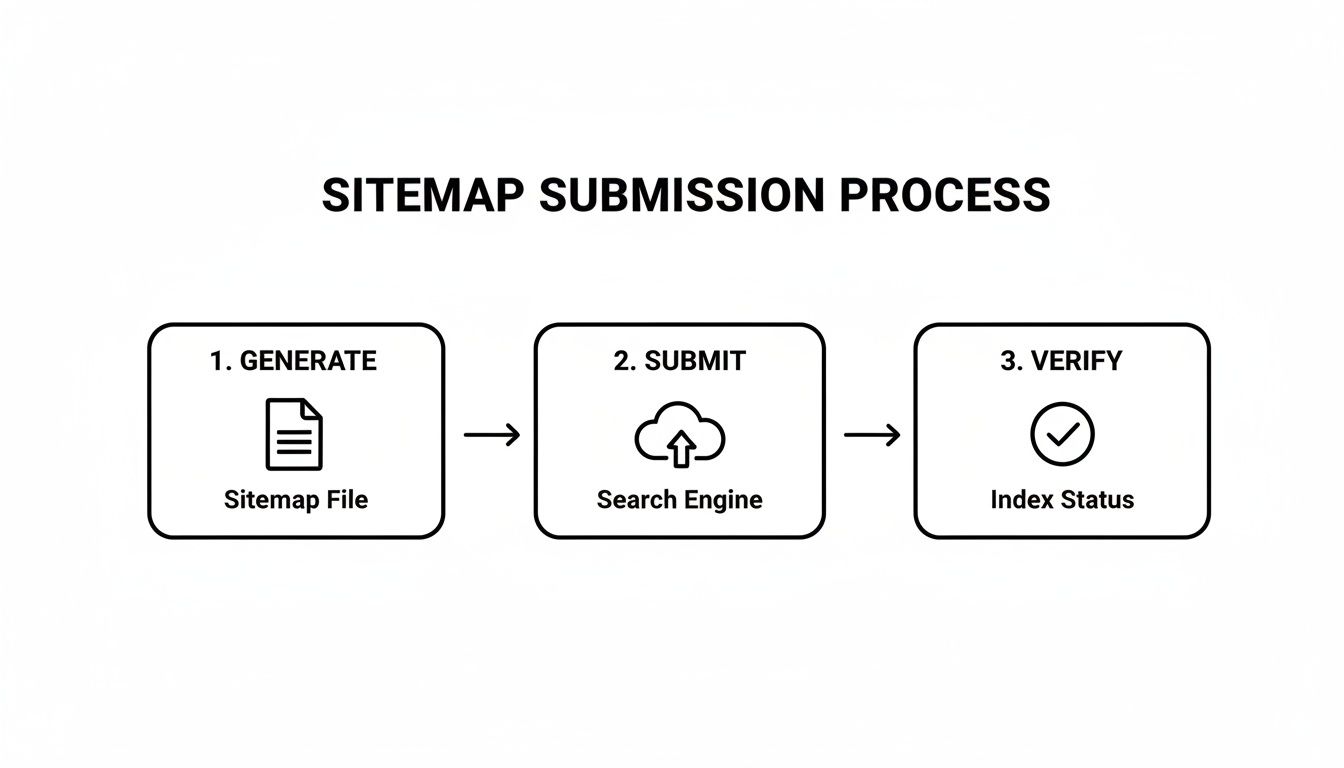
Each of these steps is an opportunity to make sure you’re presenting a clean, optimized map of your very best work.
Curate Your URLs With Purpose
Your sitemap shouldn't be a directory of every single page on your site. Think of it as an exclusive guest list for Googlebot—only your high-quality, canonical URLs should make the cut.
This means you need to actively exclude pages that bring little to no SEO value. A bit of house cleaning here prevents search engines from wasting their limited crawl budget on pages that don't help you rank.
Here’s what to leave out:
Internal Search Results: Any page generated by your site's search bar (like
yoursite.com/?s=query) has no place in your sitemap."Thank You" Pages: While important for user experience after a conversion, these pages have zero value for someone searching on Google.
Thin or Duplicate Content: If a page has barely any unique content or is a copy of another, keep it off the map.
Low-Value Archives or Tags: Unless your tag and archive pages are a core part of your site's navigation and offer real value, they often just add noise.
By being selective, you focus crawl activity squarely on the pages that can actually drive traffic and conversions. An optimized sitemap helps reduce crawl waste and guides users to your most important pages. This is critical when you consider that 88.5% of users will ditch a site if it loads too slowly. A page loading in just 1 second can hit a conversion rate near 40%. You can dive deeper into these impactful website statistics to see why directing crawlers to your best, fastest pages is a winning strategy.
Use Sitemap Attributes Wisely
XML sitemaps let you add extra data tags for each URL, but search engines don't treat them all equally anymore. Knowing where to focus your attention can save you a ton of time.
Key Takeaway: The
<lastmod>tag is the only attribute that genuinely influences crawling. Google has been very clear that it largely ignores<priority>and<changefreq>because webmasters rarely keep them updated accurately.
Pour your energy into keeping the <lastmod> tag accurate. This little piece of data tells search engines the last time a page’s content was updated. When Google sees a fresh date in the <lastmod> tag for a URL it’s already indexed, it’s a strong signal to swing back by and see what’s new.
This is especially important for pages you update often:
Blog Posts: When you refresh an article with new stats or information.
Product Pages: When you change pricing, descriptions, or stock status.
Service Pages: When you tweak your service offerings.
Thankfully, most modern CMS platforms and SEO plugins handle the <lastmod> attribute for you. Still, it’s always worth double-checking that it’s working correctly. An accurate timestamp helps your freshest content get noticed and indexed much faster.
Troubleshooting Common Sitemap Errors
Sooner or later, you'll probably log into Google Search Console and see a notification about your sitemap. Don't panic. This is a completely normal part of managing a website, and most of these errors are surprisingly easy to fix once you know what to look for.
Think of these alerts as helpful feedback, not a penalty. Google is just telling you that something is preventing them from using your sitemap as intended. By tackling these issues, you're making sure your roadmap for search engine crawlers is crystal clear and effective.
Decoding "Sitemap Could Not Be Read"
This is one of the most frequent errors you'll encounter, and it’s usually caused by a simple formatting mistake or a server hiccup. It just means Google tried to access your sitemap file but couldn't make sense of its contents.
Here are the usual suspects:
Incorrect XML Formatting: Even a tiny typo can throw the whole thing off. A missing
</url>tag or an unescaped ampersand (&) in a URL is all it takes to make the entire file unreadable.File Permissions: Your
sitemap.xmlfile needs to be publicly accessible so Googlebot can read it. If your server permissions are too strict, Google will get blocked at the door.Server Downtime: If your server was temporarily offline when Google came knocking, you'll see this error. It often resolves itself on the next crawl attempt, so it's not always a cause for alarm.
The quickest fix is to pop your sitemap URL into an online XML validator. These tools are fantastic for pinpointing syntax errors instantly, saving you from the headache of manually scanning thousands of lines of code.
Resolving URL-Specific Issues
Sometimes the sitemap file itself is perfectly fine, but Google runs into trouble with specific URLs inside it. These errors are much more targeted, which usually makes them easier to diagnose.
A classic mistake is including URLs in your sitemap that you've blocked with your robots.txt file. You’re essentially sending mixed signals: the sitemap says "crawl this page," but robots.txt says "stay away." The fix is simple: either take the URL out of the sitemap or update your robots.txt to allow crawling.
Another common problem is listing URLs that aren't actually live pages. This includes pages that return a 404 (Not Found) error or URLs that redirect somewhere else. Every single URL in your sitemap needs to lead directly to a live, canonical page with a 200 OK status code. If you've recently changed your site structure, our guide on how to do a 301 redirect can help you get those old URLs pointing to the right new ones.
If you fix your sitemap errors but find your pages are still being crawled but not indexed, you might be dealing with a different challenge. For a deeper dive, check out this excellent guide on fixing 'crawled currently not indexed' issues, which provides practical steps for these trickier indexing problems.
Answering Your Top Sitemap Questions
Let's wrap up by tackling some of the questions I hear most often about sitemaps. Getting these details straight will help you feel more confident and make sure all your hard work on SEO actually pays off.
How Often Should I Be Updating My Sitemap?
The short answer is: as often as your site changes. Every time you publish a new blog post, add a service page, or even delete old content, your sitemap should reflect that change.
The good news is that most modern tools handle this for you. If you’re using a CMS plugin like Yoast SEO, an automated sitemap generator, or an all-in-one platform like Alpha, the sitemap updates itself in the background. You really only need to worry about manual updates if you built the file from scratch, which is pretty rare these days.
My Website Is Small. Do I Really Need a Sitemap?
Yes, you absolutely do. While it's true that massive e-commerce sites with thousands of product pages get the most obvious benefit, sitemaps are crucial for small sites, too.
For a brand new site with very few backlinks, a sitemap is often the fastest way to get all your pages on Google's radar. It’s like handing a search engine a clean, simple map to your digital front door, ensuring it doesn't miss anything.
What's the Real Difference Between an XML and HTML Sitemap?
This is a really important one to get right. They serve completely different purposes.
An XML sitemap is made for machines. It's a raw list of URLs written in a language that search engine bots can easily digest. Its only job is to help them crawl and index your content efficiently.
An HTML sitemap, however, is for people. It’s a visible, clickable page on your website that acts like a table of contents, helping human visitors find what they're looking for.
You absolutely need the XML version for SEO. The HTML version is a nice bonus for user experience.
The importance of a well-organized sitemap has only grown since Google moved to mobile-first indexing. With 59–65% of global website traffic in 2023 coming from mobile devices, search engines now prioritize the mobile version of your site. A sitemap that accurately reflects your mobile structure isn't just a technical check-box anymore; it's fundamental to being seen where your audience is actually searching. You can dig into more of these website statistics and trends if you're curious.
My biggest piece of advice? Don't just submit your sitemap and forget it. Pop into Google Search Console every now and then to check for errors. Catching problems like broken links or accidentally blocked pages early is the key to keeping your site healthy and easily crawlable.
Ready to build a website where SEO is handled for you, automatically? With Alpha, you can launch a stunning, optimized site in minutes without ever having to think about sitemap creation or updates. Turn your ideas into reality today!
EXAMPLES
Build beautiful websites like these in minutes
Use Alpha to create, publish, and manage a fully functional website with ease.