





How to Create Website Mockups People Actually Love
Learn how to create website mockups that bridge the gap between idea and reality. Our guide covers tools, principles, and developer handoff.
EXAMPLES
Build beautiful websites like these in minutes
Use Alpha to create, publish, and manage a fully functional website with ease.
I've seen it happen more times than I can count: a business dives headfirst into a website redesign, full of excitement, only to find themselves drowning in chaos a few weeks later. The budget is blown, the deadline is a distant memory, and nobody can agree on what the final product should even look like.
This is exactly what a website project plan is designed to prevent. Think of it as the master blueprint for your entire project. It's the single document that lays out every single step, from your high-level business goals all the way down to the launch day checklist. It’s what keeps your team, your budget, and your timeline from going off the rails.
Why a Solid Website Plan Is Your Most Important Asset
Starting a web project without a plan is like trying to build a house without architectural drawings. You might end up with four walls and a roof, but it's not going to be the house you envisioned, and the process will be a nightmare of wasted time and money. For small businesses and entrepreneurs, where every resource is precious, that’s a risk you just can’t afford.
When you skip the planning phase, you're practically inviting disaster. The most common culprit? Scope creep. It starts small—a "quick" new feature here, a "minor" design tweak there—and before you know it, your simple project has morphed into a monster that devours your budget and pushes your launch date into oblivion.
Turning Chaos into Clarity
A thoughtfully crafted project plan is your best defense against this kind of chaos. It forces you to get specific and define what "success" actually looks like before a single line of code is written or a pixel is pushed. By thinking through all the details upfront, you create a single source of truth that everyone on the project can refer back to.
This document does a few crucial things for you:
Gets Everyone on the Same Page: It ensures your designer, developer, copywriter, and marketing folks are all rowing in the same direction.
Defines the Finish Line: You establish clear, measurable goals. You’ll know precisely what the site needs to accomplish to be considered a success.
Avoids Painful Misunderstandings: It clarifies everyone's expectations about features, timelines, and deliverables right from the start.
Protects Your Resources: It helps you allocate your budget and team's time where they’ll have the biggest impact.
A project plan isn't just a to-do list; it's an agreement. It's the pact you make with yourself and your team about what you're building, why you're building it, and how you'll know when you've won.
The Foundation for Growth
With so many powerful website-building tools available today, it's tempting to just jump in and start creating. The global website builders market is absolutely exploding, set to grow from USD 3.94 billion to a staggering USD 49.12 billion by 2034, according to research from market.us. This boom is fueled by entrepreneurs who want a professional online presence without needing a computer science degree.
But a great tool is only as good as the strategy behind it. A plan ensures you're using these platforms to build something strategic—not just a pretty online brochure that doesn't actually perform.
Ultimately, your website is a core business asset. It should be a lead-generating, sales-driving, brand-building machine. A meticulous plan is what ensures you’re not just launching a website, but a powerful engine for growth. To understand this connection better, take a look at our guide on why website design is important for hitting your business goals.
Defining Your Website Goals and Project Scope
Before a single pixel gets placed or a line of code is written, every successful website project starts by answering one deceptively simple question: Why are we doing this?
It sounds obvious, but without a rock-solid "why," your project is adrift. You'll have no compass for making smart decisions about design, features, or content. Everything that follows hinges on getting this first part right.
Setting Clear and Measurable Objectives
Your website goals are the specific business outcomes you need to achieve. We're not talking about fuzzy ambitions like "improving our online presence." We need tangible, measurable targets that directly contribute to your company's bottom line.
Are you trying to feed your sales team a steady stream of qualified leads? Is the primary goal to sell products directly from the site? Or are you aiming to become the go-to resource in your industry?
Think of it like setting a destination in your GPS. A vague goal gets you nowhere, but a precise one guides every turn. Here’s what strong, actionable goals actually look like:
Generate 50 qualified leads per month through our new contact form within six months.
Increase online sales by 25% next quarter by simplifying the checkout process.
Cut down on customer support tickets by 15% by building out a killer FAQ and knowledge base.
Rank in the top five on Google for three of our main keywords within a year.
See the pattern? Each one is tied to a number and a timeframe. This is how you prove the project was a success and delivered a real return on investment.
Nailing Down Your Project Scope
Once you know your "why" (the goals), it's time to lock down the "what"—your project scope. The scope is a detailed agreement that spells out exactly what the website will do and, just as crucially, what it will not do. This document is your best friend in the fight against scope creep, that sneaky villain that blows up timelines and budgets with "just one more thing."
Think of your scope document as an inventory of every page and feature. Start with the basics that most businesses need:
Home
About Us
Services or Products
Contact Us
Blog
Then, get granular about the specific functionality required to hit your goals. If your objective is e-commerce, your scope absolutely must include a shopping cart, payment gateway, and customer accounts. If it's lead generation, you'll need things like contact forms and maybe a newsletter signup. For anyone diving into e-commerce, a good guide to starting an online clothing store can be a goldmine during this planning stage, as it details things like finding your niche and building a brand.
Your scope statement is your project’s constitution. It sets the rules and boundaries that keep everyone focused on the agreed-upon deliverables, preventing detours that waste time and money.
This focused approach is especially important for small businesses, which are the engine behind the massive website builder market. That market hit USD 2.1 billion in value and is expected to climb to USD 3.9 billion by 2032. This boom is all about giving entrepreneurs powerful, easy-to-use tools.
To help you get started, here's a quick rundown of the essential components that should be in every website project plan.
Core Website Project Plan Components
Component | Purpose | Key Questions to Answer |
|---|---|---|
Project Goals | To define the "why" and establish clear, measurable business objectives. | What specific business results should this website achieve? |
Scope Definition | To outline all features, pages, and functionalities—and what's excluded. | What will the website do? What will it not do? |
Target Audience | To identify the primary users the website is built for. | Who are we trying to reach, and what do they need? |
Key Milestones | To break the project into manageable phases with clear deliverables. | What are the major checkpoints from start to finish? |
Timeline | To set realistic deadlines for each phase and task. | When will each part of the project be completed? |
Budget | To allocate resources for design, development, content, and maintenance. | What is the total cost, and how is it broken down? |
Risk Assessment | To identify potential problems and plan how to address them. | What could go wrong, and what's our backup plan? |
Thinking through each of these areas upfront saves countless headaches down the road.
Defining your scope also means being brutally honest about limitations. You might decide, for example, that a customer forum or multilingual support is a "Phase 2" item. Stating these exclusions right at the beginning manages expectations and keeps everyone aligned.
Ultimately, a tight scope ensures every feature you build serves a purpose and is directly tied to a business goal. With that clarity, you're ready to think about the next big piece of the puzzle: your content. If you need a hand with that, you might find our guide on how to create a content strategy helpful.
Putting Your Team Together and Defining Roles
Even if you're a solopreneur tackling this project alone, you'll be wearing a lot of different hats. Forgetting one of them means a critical part of the process gets dropped. Defining who's responsible for what is the bedrock of a smooth project, making sure every task has a clear owner from the get-go.
This isn't about building a massive corporate hierarchy; it's about being honest about all the jobs that need to get done. Forgetting to assign someone to "Quality Assurance," for instance, is a classic recipe for launching a beautiful site that’s riddled with broken links. When you have clear ownership, you avoid bottlenecks and the dreaded, "Oh, I thought you were doing that" conversation.
The Key Players on Any Web Project
Every website build, whether it's a massive team effort or a one-person show, needs these core functions covered. One person might juggle all of them, or you might have a specialist for each. What really matters is that someone is explicitly on the hook for each area.
Project Manager: Think of this person as the conductor of the orchestra. They're the one watching the clock, managing the budget, and making sure everyone is talking to each other. Ultimately, they're the single point of contact responsible for getting the project over the finish line.
Content Creator: This is your storyteller. They're responsible for every word, image, and video on the site—from writing persuasive service descriptions to finding the perfect photos. They own the brand's voice and make sure the message is crystal clear.
Designer (UI/UX): The designer is all about the look, feel, and flow. They create the visual mockups, pick the fonts and colors, and map out how a visitor will move through the site to find what they need. It's about making it both beautiful and intuitive.
Developer/Implementer: This is the builder. Whether they're coding from scratch or using a platform like Alpha, they're the one who turns the designer's vision into a real, working website.
Quality Assurance (QA) Tester: This role is your secret weapon, and it's criminally overlooked on smaller projects. The QA tester is a professional bug-hunter. They click every button, test every form, and view the site on different browsers and phones to find problems before your customers do.
Clarifying roles is the best preventative medicine for project chaos. When everyone knows exactly what they own, accountability becomes second nature, and the project moves forward with purpose and speed.
A Simple Tool for Total Clarity: The RACI Chart
When you have more than one person involved, a little confusion can quickly grind everything to a halt. This is where a simple RACI chart becomes an incredibly powerful part of your website project plan. It’s a simple grid that prevents any ambiguity.
RACI stands for:
Responsible: The person who actually does the work.
Accountable: The person who owns the outcome. The buck stops here.
Consulted: Someone whose input is needed. They're part of the conversation.
Informed: Someone who just needs to be kept in the loop on progress.
For a task like "Write the 'About Us' page copy," your Content Creator is Responsible, the Project Manager is Accountable, the company founder might be Consulted for key details, and the Designer is Informed so they can plan the layout.
Taking ten minutes to map this out ensures nothing falls through the cracks. It proactively answers questions like, "Who has the final say on the design?" or "Who needs to approve the copy before we publish?" Answering those questions now saves you from major headaches later.
Building a Realistic Project Timeline with Milestones
A project plan without a timeline is just a wish list. This is where you anchor your goals to a calendar, transforming the ambitious "what" into a concrete "when." Without a clear schedule, you're flying blind, and that's a surefire way to blow your budget and miss your launch date.
The secret to mapping out a successful project isn't trying to eat the whole elephant at once. You have to break down the massive task of "building a website" into smaller, much more digestible phases. This simple act of chunking down the work makes everything feel more manageable and keeps the team from feeling overwhelmed.
Breaking It Down Into Major Phases
Most website projects follow a pretty natural and logical progression. Each stage builds on the last, ensuring you’re creating something solid from the ground up rather than just slapping pieces together chaotically.
This image shows a classic four-phase flow that works for almost any website build.
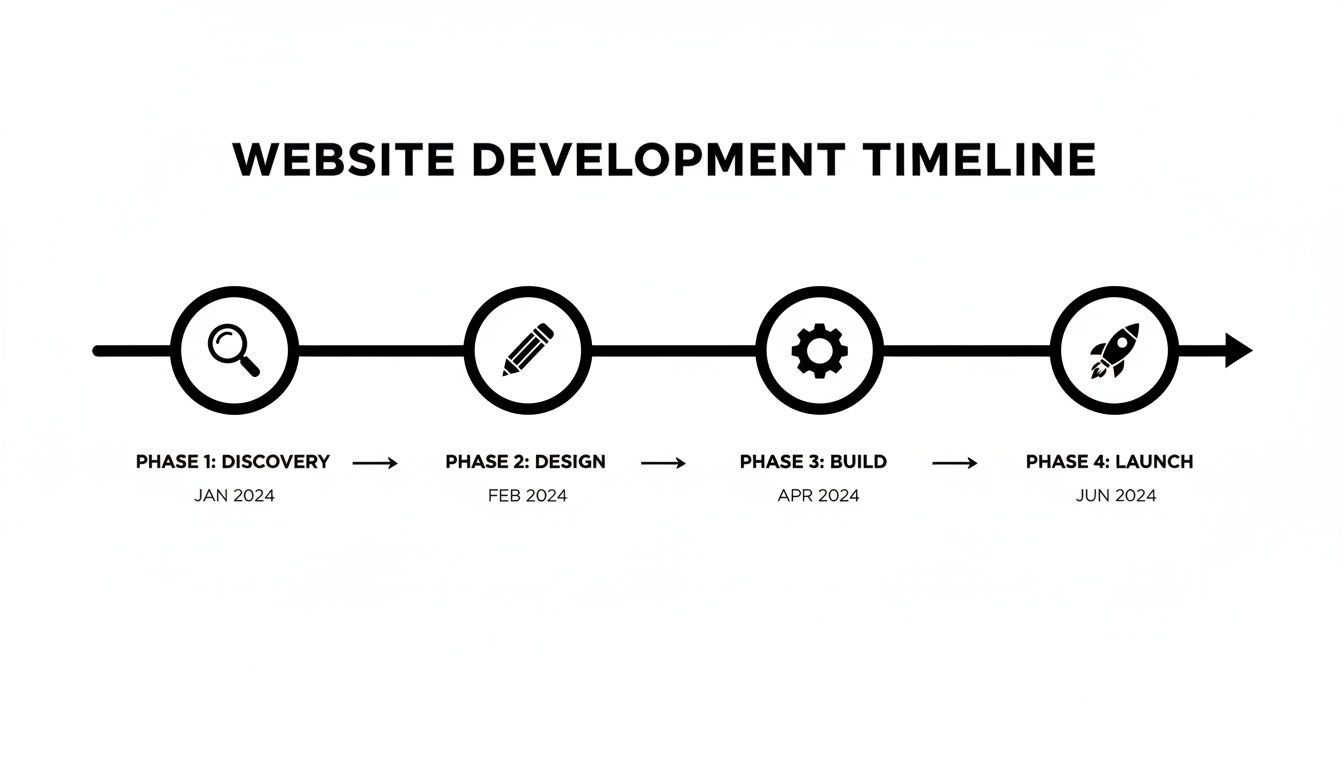
It’s a simple but powerful visual that helps everyone—from developers to the CEO—understand the journey from an idea to a live site.
For a more detailed breakdown, I like to expand this into six distinct phases:
Discovery & Strategy (Weeks 1-2): This is all about the prep work. We're defining goals, figuring out who the audience is, sizing up the competition, and locking down the project scope.
Design & UX (Weeks 3-5): Time to get visual. This stage is dedicated to creating wireframes (the basic blueprint for each page) and then building out the high-fidelity mockups that establish the final look and feel.
Content Creation (Weeks 2-6): This often runs alongside the design phase. It involves writing every piece of copy, gathering photos, and producing any necessary videos. Don't underestimate this one; content is a notorious bottleneck, so starting early is absolutely critical.
Development & Build (Weeks 6-10): Here's where the approved designs get turned into a living, breathing website. Whether you're using a no-code platform like Alpha or coding from scratch, this is when the site really starts to take shape.
Testing & QA (Weeks 11-12): Before you even think about going live, every link, form, and button needs to be mercilessly tested across different browsers and devices. It’s your last chance to find the bugs before your customers do.
Launch & Post-Launch (Week 13+): The big day is here. After the site goes live, there's always a period of close monitoring for unexpected issues, collecting user feedback, and planning out the next round of improvements.
Setting Meaningful Project Milestones
Within each of these phases, you need to set clear milestones. These aren't just tiny to-do list items; they are major checkpoints that signify the completion of a significant chunk of work. Think of them as signposts on your journey, confirming you’ve arrived at a key destination and are clear to proceed.
Milestones make progress tangible. They turn a long, daunting project into a series of achievable wins, keeping your team motivated and stakeholders informed.
Here are a few real-world examples of what solid milestones look like:
Discovery: Project Scope Signed Off
Design: Homepage and Key Page Mockups Approved
Content: All Service Page Copy Finalized and Submitted
Development: Functional Beta Version Ready for Internal Review
Testing: All Critical Bugs Resolved and QA Passed
Hitting and celebrating these milestones is huge for team morale. It also ensures everyone is aligned before you invest time and resources into the next stage.
Visualizing the Timeline with a Gantt Chart
Once you've got your phases and milestones, the best way to see how it all fits together is with a Gantt chart. It’s essentially a bar chart that maps every task against a calendar, giving you an instant visual of who is doing what, and when.
More importantly, it shows you dependencies—those crucial tasks that can't begin until another is finished. For example, you can't start development until the designs are approved. Laying these out visually helps you spot potential logjams long before they derail your project.
You can use dedicated tools like Asana or Trello for this, but for smaller projects, even a well-organized spreadsheet can get the job done. This visual roadmap keeps the entire team on the same page and gives stakeholders a clear, high-level view of progress at a glance.
Using AI to Seriously Speed Up Your Project Plan
Having a solid website project plan is non-negotiable, but what if you could actually execute that plan in half the time? This isn't just wishful thinking anymore. Modern AI tools have moved past the gimmick stage and are now legitimate project accelerators, capable of slashing the time it takes to get from a great idea to a live, high-performing website.
This is where a platform like Alpha becomes your secret weapon. Instead of getting buried in tedious manual tasks, you can automate the most time-consuming parts of the build. It’s all about working smarter to bring your vision to life, faster.
Get Proven Designs Instantly from a URL
Let's be honest: one of the biggest time-sucks in any web project is the initial design phase. The back-and-forth with a designer to get the homepage structure just right can burn dozens of hours. AI completely flips this on its head.
Imagine you've spotted a competitor’s website with a layout you love. It’s clean, it’s professional, and you know it works because they’re a market leader. Normally, you’d have to describe it to a designer or try to recreate it block by block. With Alpha’s URL import, you just paste the link.
The AI gets to work, analyzing the site's structure, layout, and key elements, then generates a fully editable version for you in minutes. As one user, Doug Roper, the Founder & CTO at Talent Spring, said, "The website format copying function is a game-changer." This feature alone can compress what used to be weeks of design work into a single afternoon.
Beat Writer’s Block with AI-Generated Copy
Content is another classic bottleneck. You know you need great copy for your services, your "About Us" page, and your product descriptions, but that blinking cursor on a blank page can be paralyzing. Writing good web copy is a tough mix of brand storytelling and conversion-focused language.
AI-powered copy generation takes that pressure right off. You give the AI a few simple prompts about your business, who you're talking to, and what you want the page to achieve, and it produces a solid first draft.
For a service page: Try a prompt like, "Write about our eco-friendly house cleaning services for busy families in Denver, focusing on trust and reliability."
For an 'About Us' story: You could say, "Tell the story of a software startup founded by two college friends who wanted to make project management simpler."
This isn't just filler text; it’s a strategic starting point. You can then jump in and refine it to perfectly match your brand's unique voice. It saves an incredible amount of time and ensures every page starts with a strong, conversion-oriented foundation. If you want to go deeper, our guide on how to build a website with AI covers these capabilities in more detail.
Streamline Your SEO and Analytics Setup
Building a beautiful website is only half the job. It has to be found. SEO can often feel like a dark art, and manually optimizing every single page is a huge time commitment in any website project plan.
Modern AI website builders don’t just give you a blank canvas; they bake SEO best practices right into the creation process. They guide you toward an optimized site from the very beginning.
Instead of spending hours researching keywords and crafting meta descriptions, you can let an AI builder handle the heavy lifting.
How AI Simplifies the Technical Stuff
AI Feature | The Manual Task It Replaces | Time Saved |
|---|---|---|
Auto-Generated Meta Titles & Descriptions | Writing unique, keyword-rich metadata for every single page. | Hours to Days |
Automatic Image Alt-Text Suggestions | Manually describing every image for screen readers and search engines. | Hours |
Built-in Performance Optimization | Manually compressing images and minifying code to speed up the site. | Hours |
This kind of automation means you can launch a site that’s already in a good position to rank on Google, removing the guesswork from technical SEO. Plus, integrated analytics tools mean you don't have to mess around with setting up tracking scripts. You get a clear dashboard showing traffic, user behavior, and conversions from day one, so you can start making smart, data-driven decisions right away.
Managing Your Budget and Planning for Risks
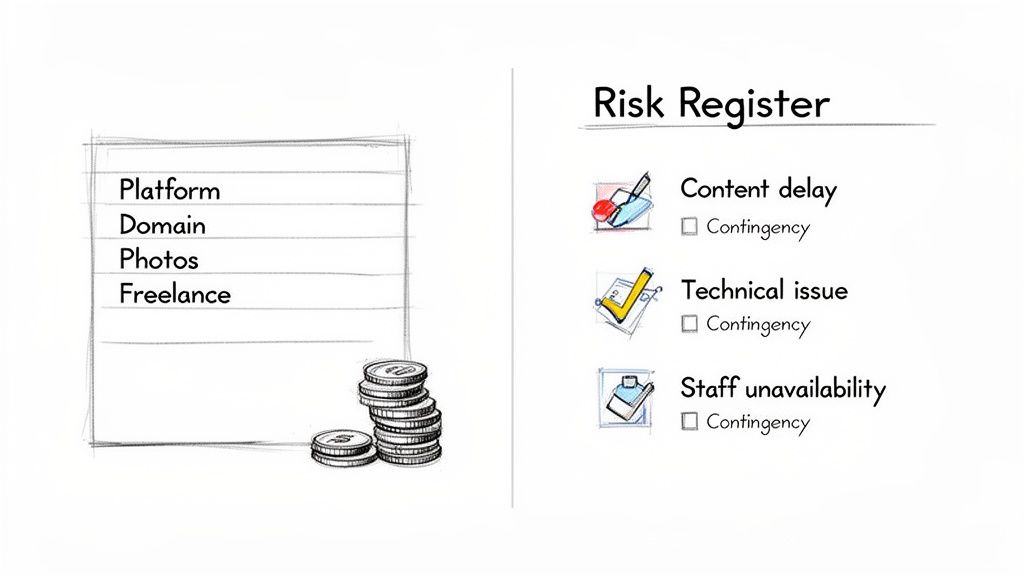
Let’s talk about two things that can turn a smooth website build into a total nightmare: money and surprises. If you don't tackle them head-on during planning, you're setting yourself up for stress. A clear budget keeps you from overspending, while a solid risk plan turns potential fires into minor hiccups.
Building a budget isn't just about what you pay for your website builder. It's about thinking through every single cost, big and small. You'd be surprised how quickly things like premium plugins or stock photo licenses can add up, creating painful, unbudgeted expenses right when you're trying to launch.
Itemizing Your Website Expenses
To get a real handle on your budget, you need to map out every component of your website's lifecycle. A simple spreadsheet will do the trick. Start with the obvious stuff and then dig deeper for those hidden costs that always seem to pop up.
Here are the typical expenses you'll want to track:
Platform & Hosting: Your annual or monthly fee for a builder like Alpha or another hosting provider.
Domain Name: The yearly fee to keep your URL registered.
Premium Themes/Plugins: Any one-time or recurring costs for specific designs or functionality.
Content Assets: Got a budget for professional photography, stock images, icons, or video?
Freelance Help: Planning to hire a copywriter, designer, or SEO specialist? Factor in their rates.
Thinking about marketing budget allocation strategies can also provide a broader perspective, helping you frame your website costs within your overall business growth plan.
Identifying and Mitigating Project Risks
With your budget sorted, it's time to play the "what if?" game. Risk management is simply about anticipating what could go wrong so you can have a solution ready before it becomes a crisis. This isn't about pessimism; it's about being prepared.
A risk plan transforms you from a reactive problem-solver into a proactive project leader. You're not just waiting for things to break; you're ready to act the moment they do.
Get your team together and brainstorm potential hurdles. For each risk you identify, come up with a simple "if this happens, we'll do that" response.
Common Risks and Simple Contingency Plans
Here are a few classic examples I've seen derail projects, and how to get ahead of them.
Potential Risk | Impact on Project | Contingency Plan |
|---|---|---|
Key Content Delays | The developer is stuck waiting for copy, pushing the entire timeline back. | Set a hard content deadline at least one week before the developer needs it. Have placeholder copy ready as a backup. |
Technical Glitches During Launch | A critical contact form or payment gateway fails, hurting sales right out of the gate. | Plan a "soft launch" with a small group of internal testers 24-48 hours before the official announcement. |
A Key Team Member Is Unavailable | The one person who knows how to do something gets sick or leaves the company. | Document all critical processes and logins in a shared, secure place. Cross-train another team member on essential tasks. |
This proactive approach within your website project plan is your insurance policy against chaos. When the inevitable hiccup occurs, it becomes a manageable bump in the road instead of a full-blown catastrophe.
Answering Your Top Website Planning Questions
Even the most detailed guide can't cover every question that pops up during the planning phase. Let's tackle a few of the most common ones I hear from teams diving into a new website project. Getting these sorted out early on will save you a world of headaches down the road.
A question that always comes up is how much time to budget just for planning. For a standard small business website, I always recommend setting aside one to two full weeks for planning before a single line of code is written or a design element is created. I know, it can feel like you're not making progress, but this upfront investment is your best defense against costly mistakes and painful redesigns later.
What's the Single Biggest Planning Mistake to Avoid?
Without a doubt, the most damaging mistake you can make is not clearly defining the project's scope. It's a classic trap. If you don't have a crystal-clear, written-down list of every page, feature, and function, you open the door to the dreaded "scope creep."
Scope creep is that slow, insidious cycle of adding "just one more little thing" that absolutely demolishes your timeline and budget. The best way to fight it? Be brutally honest and specific about what's included in the project, and—just as critically—what is not.
A great project plan doesn't just outline what you're going to do. It also draws a hard line in the sand about what you won't do. That boundary is your project's most valuable shield.
Can I Still Use a Project Plan if I'm Using an AI Website Builder?
Yes, and you absolutely should. A solid project plan makes an AI builder an even more effective tool. Think of your plan as the strategic blueprint; it defines your goals, audience, and content with real precision.
The AI then becomes the high-speed construction crew that brings your specific vision to life. For example, you can take the competitive analysis from your plan and feed a reference site into an AI design import tool. This ensures the final website isn't just a pretty template, but a strategic asset that's perfectly aligned with your goals, helping you launch a smarter site, faster.
Ready to put that plan into action? With Alpha, you can use AI to generate a stunning, conversion-focused website in minutes, not months. Start building for free today.
EXAMPLES
Build beautiful websites like these in minutes
Use Alpha to create, publish, and manage a fully functional website with ease.